Your resume looks great to you. But does it look great to a computer?
Most companies now use an applicant tracking system, or ATS, to sort resumes before a human ever sees them. This software reads your resume, checks it against the job post, and gives it a score. If your score is too low, a recruiter may never open your file.
This guide breaks down how an ATS works, how to write an ATS-friendly resume, and which tools actually help. You will also get real before-and-after examples, a resume template, and a checklist you can use right now.
Table of contents
- What Is ATS Optimization?
- How Does an ATS Screen Your Resume?
- How to Optimize Your Resume for ATS
- ATS Optimization Examples: Before and After
- How to Check Your ATS Score
- Best ATS Resume Checkers and Tools
- ATS-Friendly Resume Template
- Download the Free ATS-Friendly Resume Template PDF
- What Are the Top ATS Systems Companies Use?
- ATS Optimization Checklist
- End Note
- FAQs
What Is ATS Optimization?
ATS optimization is the process of formatting and writing your resume so an applicant tracking system can read it correctly and match it to a job post.
An applicant tracking system is software that companies use to manage hiring. It collects resumes, screens them, and helps recruiters shortlist candidates.
Almost every large company uses one now. Studies show that:
- About 97.8% of Fortune 500 companies use an ATS
- 78% of mid-sized companies use an ATS
- 35% of small businesses use an ATS
The main reason is application volume. According to Jobscan, the average job posting received about 130 applications in 2022, making it difficult for employers to review every resume manually. A recruiter spends about six seconds on a first resume scan. Software has to do the heavy lifting first.
There are two types of ATS in use today:
- Older, rule-based systems. These search for exact keyword matches. If your resume uses different words than the job post, the system may miss your match.
- Newer, AI-based systems. These understand meaning, not just exact words. They can connect similar skills and job titles, but they still reward resumes that use the same language as the job post.
Either way, your resume needs to speak the same language as the job description. That is the whole point of resume optimization.
How Does an ATS Screen Your Resume?
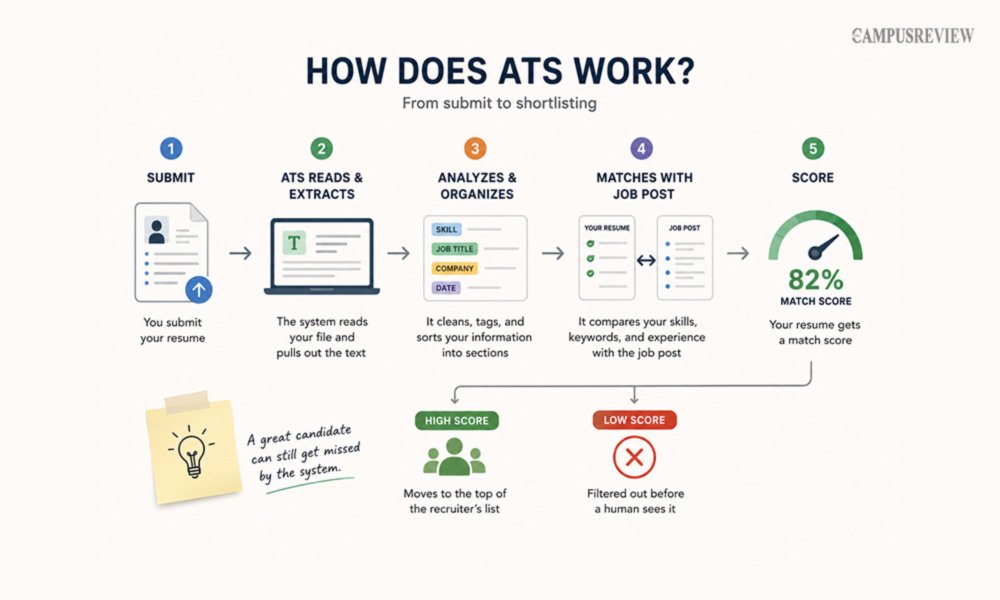
Here is what happens in plain terms, step by step, after you hit submit.
The system reads your file. It pulls text out of your PDF or Word document.
- It cleans up the text. It removes odd symbols and fixes spacing so the words are easy to search.
- It tags each word. The system determines whether a word is a skill, a job title, a company name, or a date.
- It sorts your resume into sections. It looks for headings like Work Experience, Education, and Skills to file your information correctly.
- It compares your resume to the job post. The system checks how many required skills, tools, and keywords show up in your resume, then gives your resume a match score.
Candidates who score high move to the top of the recruiter’s list. Candidates who score low often get filtered out before a human ever sees the resume.
This is why resume formatting matters as much as your experience. A great candidate with a messy layout can still get missed by the system.
How to Optimize Your Resume for ATS
Follow these steps to build a resume that both software and humans can read with ease.
1. Use Keywords From the Job Description
This is the single most important step in resume optimization.
- Read the job post closely.
- Note the job description keywords: exact skills, tools, and certifications it lists.
- Add these same resume keywords to your resume, where they honestly apply.
Keep technical terms exact. Write “React.js” as “React.js,” not “React” or “Reactjs.” Write “Search Engine Optimization (SEO)” in full at least once, then you can use the short form.
Do not just copy and paste the job post. Only add skills you actually have.
2. Choose an ATS-Friendly Resume Format
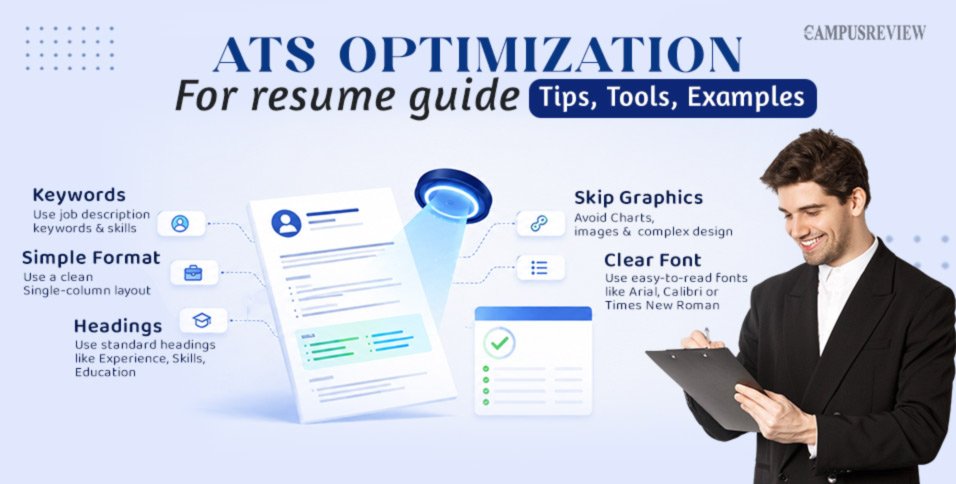
Skip fancy, multi-column resume templates from design tools. They look nice to a human, but they confuse most parsers.
Here is why. The system reads a page left to right, top to bottom. A two-column layout can mix up your job titles with your skills list, creating a jumbled mess in the system’s memory.
| Format Type | Parse Accuracy |
| Single-column, simple layout | 95% to 99% |
| Two-column, design-heavy layout | Much lower, with frequent errors |
Stick to one column. Save the creative design for your portfolio site, not your ATS resume.
3. Use Standard Resume Section Headings
Use section titles the system already recognizes:
- Work Experience
- Education
- Professional Skills
- Professional Summary
- Certifications
Avoid creative headings like “My Journey” or “Where I’ve Excelled.” The system may not know where to file that information, and your details could get dropped entirely.
4. Skip Graphics, Icons, and Tables
Skill bars, icons, headshots, and text boxes look modern. But most parsers cannot read them.
- Charts and graphics often get skipped or read as blank space.
- Text placed inside tables or text boxes is often missed.
- Skill rating bars do not transfer any real information to the system.
Stick to plain text. Say “Advanced in Excel,” not a five-star graphic.
5. Use Clear Fonts and Simple Formatting
Pick standard fonts like Arial, Calibri, Times New Roman, Helvetica, or Georgia. These read cleanly across every system.
Avoid decorative or custom fonts. They can turn your letters into broken symbols during the scan.
Use simple round or square bullet points too. Skip arrows, stars, or custom icons as bullets.
6. Write Strong, Keyword-Rich Bullet Points
Every bullet point should show what you did, how you did it, and the result.
Try this simple formula: Accomplished [X], measured by [Y], by doing [Z].
For example: “Managed customer support requests using Zendesk, resolving 95% of issues within a 24-hour SLA.”
This single line hits three targets: a real tool (Zendesk), a clear metric (95%), and a strong action verb (Managed).
7. Use the Right File Format
| File Format | Best For |
| Text-based PDF | Modern platforms like Greenhouse and Lever |
| Word document (.docx) | Safest, most universal choice across older and newer systems |
| Scanned image PDF | Avoid. These fail almost every scan. |
If you are not sure which ATS a company uses, a clean .docx file is the safest bet.
ATS Optimization Examples: Before and After
Small wording changes can turn a weak bullet point into an ATS optimization sample worth copying. Here is how real bullet points improve.
| Role | Weak Version | Optimized Version |
| Customer Support Specialist | Handled customer-related tasks and answered phone calls every day. | Managed customer support requests using Zendesk, resolving 95% of technical issues within a 24-hour SLA and improving CSAT scores by 18%. |
| Software Engineer | Responsible for coding backend services and fixing bugs. | Architected microservices using Python and PostgreSQL, reducing API query latency by 35% and resolving 40+ Jira tickets per sprint. |
| Project Manager | Led team meetings and helped deliver projects on schedule. | Led Agile Scrum workflows across teams of 12 engineers, delivering 4 software launches on schedule and 10% under budget using Asana. |
| Digital Marketing Specialist | In charge of managing digital ads and writing social content. | Ran PPC campaigns on Google Ads and Meta Manager, lifting CTR by 22% and generating $150K in new pipeline revenue. |
Notice the pattern. Every optimized version adds a real tool, a number, and a strong verb.
How to Check Your ATS Score
An ATS score check tells you how well your resume matches a specific job post before you hit submit.
Most tools run two types of checks:
- A format check. This looks at your resume structure. Does it have a phone number, clear section headings, and readable formatting?
- A match check. This compares your resume text with the job description to see how closely your skills and keywords match.
To check your ATS score, run a free ATS resume scan by uploading your resume and the target job description into a checker tool. You will get a resume score as a percentage, along with a list of missing keywords and potential formatting issues to fix.
Best ATS Resume Checkers and Tools
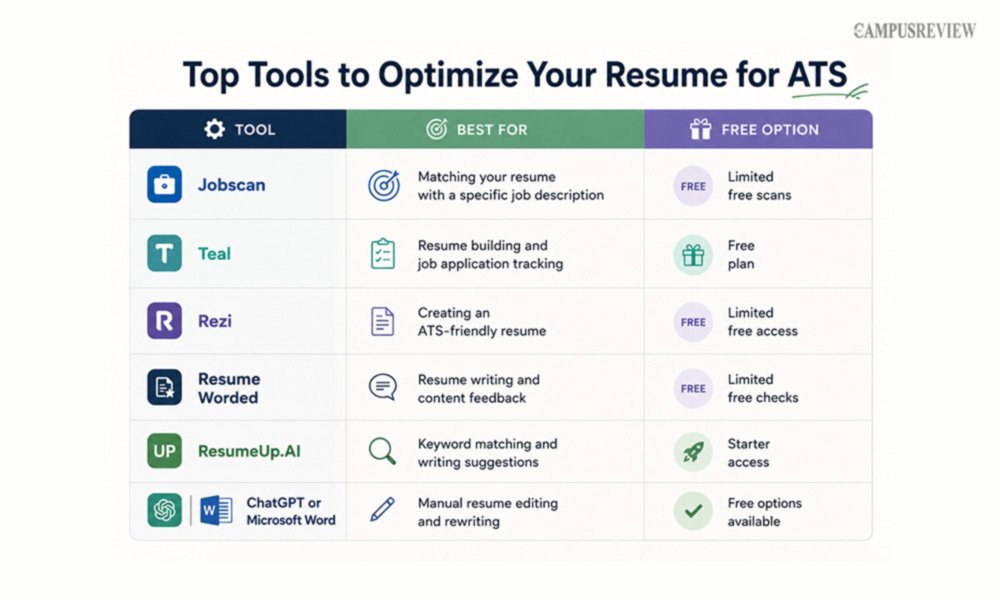
I tested these ATS optimization checkers and tools based on keyword matching, resume feedback, ATS compatibility, ease of use, and free features. Each ATS tool serves a different purpose, so the right choice depends on whether you want to check your resume against a job description, improve your writing, or build an ATS-friendly resume.
| Tool | Best For | Free Option |
| Jobscan | Matching your resume with a specific job description | Limited free scans |
| Teal | Resume building and job application tracking | Free plan |
| Rezi | Creating an ATS-friendly resume | Limited free access |
| Resume Worded | Resume writing and content feedback | Limited free checks |
| ResumeUp.AI | Keyword matching and writing suggestions | Starter access |
| ChatGPT or Microsoft Word | Manual resume editing and rewriting | Free options available |
Which ATS Resume Checker Should You Use?
Based on my testing, Jobscan works well for comparing your resume with a specific job description and identifying missing keywords. Teal is a better fit if you want resume building and job application tracking in one place.
If you are creating a new resume, Rezi can help you structure it with ATS-friendly formatting. For improving resume language and content, Resume Worded provides useful writing feedback.
A practical workflow is to build or refine your resume with Rezi or Teal, then check it against the specific job description using Jobscan. This can help you identify relevant keywords and make targeted changes before submitting your application.
Note: Free features and scan limits can change, so check each tool’s current offering before relying on a free plan.
ATS-Friendly Resume Template
Use this structure as your ATS resume template. It follows the order most systems expect.
Want to use the template directly? Download our free ATS-friendly resume template and customize it with your own experience, skills, education, and achievements.
Download the Free ATS-Friendly Resume Template PDF
| Header Full nameCity, statePhone numberProfessional emailLinkedIn URL Professional Summary Three to four lines covering your experience, target role, and top achievements Professional Skills 8 to 12 hard skills that match the job descriptionSoftware and tools, written with correct spelling and capitalization Professional Experience Company name, job title, dates, and locationThree to five bullet points per role, each with a verb, a skill, and a result Education and Certifications Degree title, field of study, school name, and graduation yearCertification name and the organization that issued it |
Pair this resume template with a strong cover letter to round out your application.
What Are the Top ATS Systems Companies Use?
Different companies use different systems, and each one has its own quirks.
| ATS Platform | Common Users | Best File Format | Tip |
| Workday | Large enterprises | DOCX or text-based PDF | Always include city and state for location matching |
| Greenhouse | Tech and mid-market companies | Text-based PDF or DOCX | Parses cleanly, so focus on strong skills sections |
| Oracle Taleo | Government and legacy enterprises | DOCX | Avoid multi-column layouts and tables completely |
| Lever | Startups and scale-ups | Text-based PDF | Keep bullet points and skill lists very clean |
| iCIMS | Mid-size to large companies | DOCX or text-based PDF | Spell out acronyms alongside short forms |
You will not always know which system a company uses. When in doubt, a single-column DOCX file is the safest choice across all five.
ATS Optimization Checklist
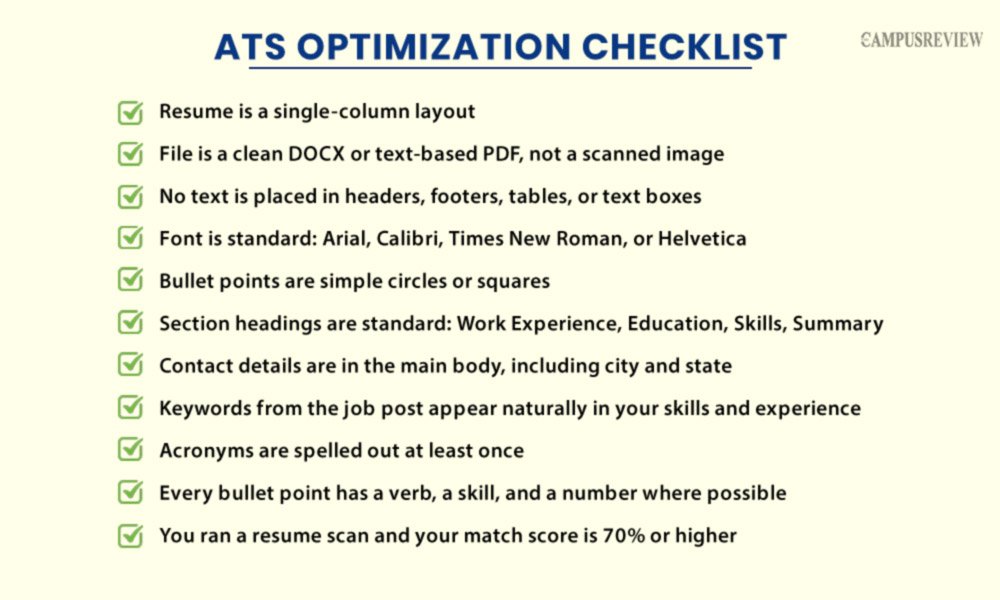
Run through this list before you submit any application.
☐ Resume is a single-column layout
☐ File is a clean DOCX or text-based PDF, not a scanned image
☐ No text is placed in headers, footers, tables, or text boxes
☐ Font is standard: Arial, Calibri, Times New Roman, or Helvetica
☐ Bullet points are simple circles or squares
☐ Section headings are standard: Work Experience, Education, Skills, Summary
☐ Contact details are in the main body, including city and state
☐ Keywords from the job post appear naturally in your skills and experience
☐ Acronyms are spelled out at least once
☐ Every bullet point has a verb, a skill, and a number where possible
☐ You ran a resume scan and your match score is 70% or higher
End Note
An ATS is not your enemy. It is just the first gate you need to pass.
Keep your format simple. Use the same keywords found in the job post. Write bullet points that show real results. Then run a quick resume scan before you hit submit.
Do this consistently, and more of your applications will reach a real recruiter, which is the whole goal of ATS optimization.
FAQs
1. How Do I Optimize My CV for ATS?
To optimize your CV for ATS, use relevant keywords from the job description, a simple single-column format, and standard section headings. Avoid graphics, tables, and complex formatting that can interfere with ATS scanning.
2. What is a good ATS score?
A score of 70% or higher is a strong, safe target for most jobs. Scores above 85% are excellent, but do not force a 100% score by stuffing keywords.
3. Can an ATS read a PDF resume?
Yes, as long as the PDF is text-based and made from a program like Word or Google Docs. A scanned image PDF will not scan well and should be avoided.
4. How many keywords should I add to my resume?
Aim for 15 to 25 core skill keywords spread naturally across your summary, skills section, and experience bullet points in your resume. Do not repeat the same keyword over and over. That does not help your score and can look like spam.
5. Can an ATS reject a resume because of formatting?
Yes. Multi-column layouts, graphics, text boxes, and unusual fonts can all block the system from reading your resume correctly. This can lead to an automatic rejection, even if you are fully qualified for the role.