The best AI study tools for students depend on the task. NotebookLM and ChatGPT work well for understanding notes and concepts, Knowt and Anki support flashcard-based revision, Perplexity helps with research, and Photomath and Wolfram Alpha are useful for maths.
This guide covers the best free and paid AI study tools for students, based on hands-on testing and research. I tested the tools to see what each one actually does, where it helps, and how students can use it effectively.
You’ll also find practical prompts you can copy and tips for using AI without losing your own learning. Prices and features were checked in 2026.
Best Free AI Study Tools for Students
The best free AI study tools include NotebookLM, ChatGPT, Perplexity AI, Knowt, Anki, and Gemini. These tools can help students summarise study material, create flashcards, research topics, understand difficult concepts, and practise for exams.
1. NotebookLM, now called Gemini Notebook
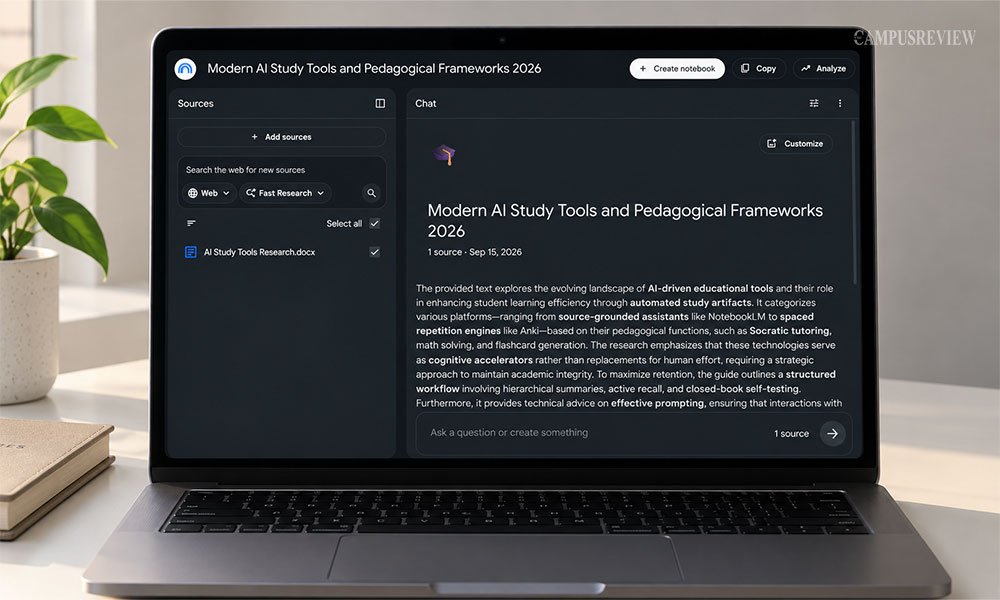
Google renamed NotebookLM to Gemini Notebook on 16 July 2026. NotebookLM is the best tool for summarising notes and course material. More than 30 million people now use it.
What it does: Reads your sources and builds summaries, flashcards, quizzes, mind maps, and audio overviews you can listen to like a podcast. The free plan gives you 100 notebooks, 50 sources per notebook, and 50 chat questions a day.
How to use it well:
- Create one notebook per subject, not one per week. Mixing subjects confuses the answers.
- Upload your syllabus first, then lecture slides, then the textbook chapters.
- Ask narrow questions. “Compare the two theories in chapter 4” beats “summarise this.”
- Click the citation number on every answer. It jumps to the exact line in your source.
- Generate an Audio Overview before a long commute or a gym session.
Insider tip: Paste a YouTube lecture link as a source. Gemini Notebook pulls the transcript and summarizes the video, which answers the common question of what AI tool can summarize YouTube videos for studying.
Best for: Students who want AI summaries built strictly from their own course material.
2. ChatGPT
ChatGPT is still one of the most familiar AI tutors powered by generative AI for students. Its Study Mode, free on every plan including the free tier, switches the model from answering to teaching.
What it does: ChatGPT’s Study Mode uses guiding questions, hints, and feedback to help students understand problems step by step. It supports Socratic learning instead of simply providing answers. ChatGPT can also simplify complex passages, create practice questions, explain concepts, debug code, and help with essay outlines.
How to use it well:
- Turn on Study Mode from the tools menu in a chat.
- Set a role and level, such as “Act as a first-year economics tutor.”
- Ask it to explain one step at a time and pause after each step.
- Share your wrong answer and ask why your reasoning went wrong, rather than asking for the correct answer.
Try this prompt: “You are a Socratic physics tutor. I do not understand Lenz’s Law. Do not explain it or give the formula. Ask me three guiding questions about magnetic flux so I work it out myself.”
Where it falls short: Study Mode is one toggle away from normal answer mode. The escape hatch is easy to use at midnight, and using it defeats the point.
Best for: Working through a concept you are stuck on.
3. Gemini
Google’s Gemini combines a general AI model with Guided Learning, which helps students explore topics through questions, explanations, and step-by-step learning rather than simply giving an answer.
What it does: Guided Learning breaks a topic into stages, pulls in images, diagrams and YouTube clips automatically, and asks you to explain your thinking before it moves on. It feels less like a chat and more like a short course module.
Gemini also reads photos, so you can snap a diagram, a handwritten sum or a slide and ask it to explain the part you missed.
How to use it well:
- Photograph the exact problem or diagram instead of typing a description.
- Ask Gemini to “teach me this step by step and quiz me at the end.”
- Ask it to turn your quiz mistakes into flashcards. It can do this directly.
Insider tip: Gemini is the strongest free option for visual subjects. Anatomy diagrams, economic graphs and circuit drawings all work.
Where it falls short: Answers pull from the open web, so verify any statistic before you cite it.
Best for: Understanding a difficult topic for the first time, particularly when the topic is easier to understand with diagrams, images, charts, or other visual explanations.
4. Knowt
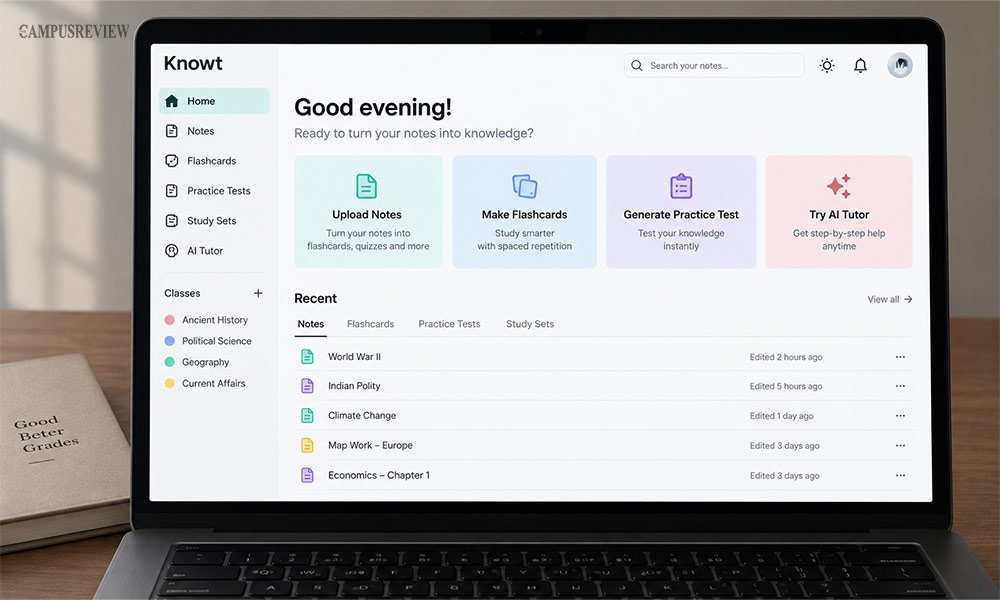
Knowt built its name as a free alternative to Quizlet. It turns notes, PDFs, or slides into flashcards and practice tests automatically, and it is used by more than 7 million students
What it does: Knowt is an AI-powered study tool that helps students turn their existing study materials into active learning resources. Students can upload notes, PDFs, slide decks, or lecture recordings, and Knowt can turn them into flashcards for quicker revision.
It also includes Learn mode, matching games, practice tests, and spaced repetition to help students review and retain information. Students can also import their existing Quizlet flashcard sets.
How to use it well:
- Import your existing Quizlet sets first so you lose nothing.
- Upload one chapter at a time. Whole textbooks produce bloated decks.
- Edit the generated cards. AI writes two facts on one card more often than it should.
- Install the Chrome extension to turn any article you read into cards.
Where it falls short: The free tier shows ads, and AI generation has monthly limits.
Best for: Students who want steady flashcard practice without hitting a paywall mid-semester.
5. Perplexity AI
Perplexity works like a search engine with a brain. It reads multiple sources at once and writes a single answer with numbered citations you can check yourself, which makes it a genuine academic search engine for students.
What it does: Perplexity runs a live web search, reads several sources at once, and writes one answer with numbered citations beside every claim. You can click any number and land on the original page. It uses semantic search, so it understands what you meant rather than matching your exact words. The Academic focus mode narrows results toward journals and papers.
How to use it well:
- Ask a narrow research question, not a broad topic.
- Switch the focus to Academic before you search.
- Open at least three citations and read the original paper, not the summary.
- Use it to find sources, then cite the source itself in your bibliography, never Perplexity.
Where it falls short: It summarizes abstracts well and full papers less well. Treat it as a map of the literature, not the literature.
Best for: Research papers, literature reviews and fact checking.
6. Anki
Anki is not new, and that is the point. It is a free, open-source flashcard app built entirely around spaced repetition, the study method with the strongest research backing for long-term memory. Studies show spaced repetition can improve long-term retention by 50 to 200 percent compared to cramming.
What it does: Anki uses spaced repetition to help students remember information for longer. It schedules flashcards based on how well you remember them, so difficult cards appear more often. Students can use it for vocabulary, formulas, definitions, and other subjects that require regular revision.
How to use it well:
- Write one fact per card. This rule matters more than any setting.
- Use cloze deletion for definitions and pathways.
- Review daily for 15 minutes. Skipping three days ruins the schedule.
- Generate cards in ChatGPT as a JSON list, then import them into Anki in bulk.
Where it falls short: The interface is dated and the setup takes an evening. The iPhone app costs money.
Best for: Long term memorisation in medicine, law and languages.
Best Freemium and Paid AI Study Tools
These tools have free plans, but the paid tier is where they get useful. Prices are US list prices checked in 2026.
| Tool | Cost | Free plan gives you | Pay for it if |
|---|---|---|---|
| Quizlet Plus | $35.99 a year, about $2.99 a month | Flashcards, Match, limited Learn rounds | You want its huge library of ready made decks |
| Quizlet Plus Unlimited | $44.99 a year | Same as above | You study daily across several subjects |
| Khanmigo | $4 a month or $44 a year | Free for verified US teachers | You are in school and want a safe AI tutor |
| RemNote | Free core plan | Notes, flashcards, FSRS scheduling | You want PDF annotation and AI credits |
| StudyFetch | Thin free trial | A small test of the platform | You want live lecture recording in one app |
| Wolfram Alpha | Basic results free | Answers without full steps | You need step by step maths working |
Quizlet
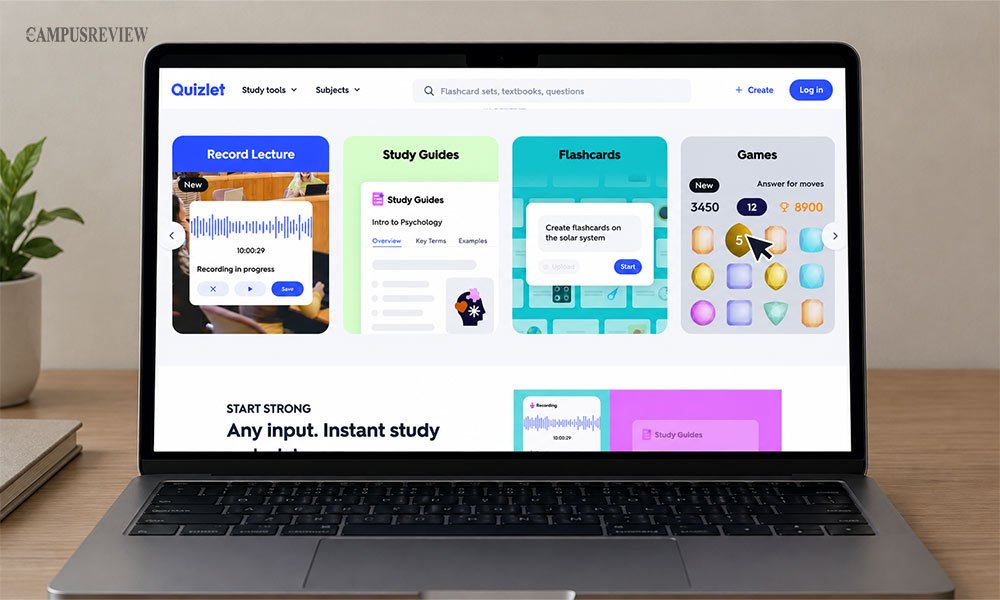
Quizlet helps students study with digital flashcards, practice tests, and ready-made study sets. You can search for existing sets by subject or textbook, or create your own from class notes. Its large library of user-created sets makes it useful when you need study material quickly.
How to use: Search for your textbook, course, or topic, choose a relevant study set, and use the flashcards to review key terms and concepts. You can also create your own set from your notes.
Best for: Fast revision and test preparation using ready-made flashcard sets.
RemNote
RemNote combines note-taking and flashcards in one app. As you write notes, you can turn important points into flashcards for later review. It also offers spaced repetition, PDF annotation, and an exam scheduler to help organize revision.
How to use: Take structured notes, turn key points into flashcards, and review them using spaced repetition. You can also annotate PDFs and schedule revision around upcoming exams.
Best for: Medical and law students who want notes and revision in the same place.
StudyFetch
StudyFetch helps students turn PDFs, slides, notes, and lecture recordings into study materials. Its AI tutor, Spark.E, creates flashcards, quizzes, and summaries from uploaded content. It also includes a Live Lecture Assistant that transcribes lectures and takes notes in real time.
How to use: Upload your study materials and use Spark.E to create summaries, flashcards, and quizzes. Turn on the Live Lecture Assistant when attending lectures.
Best for: Students who want one app for notes, revision, and lecture support.
Khanmigo
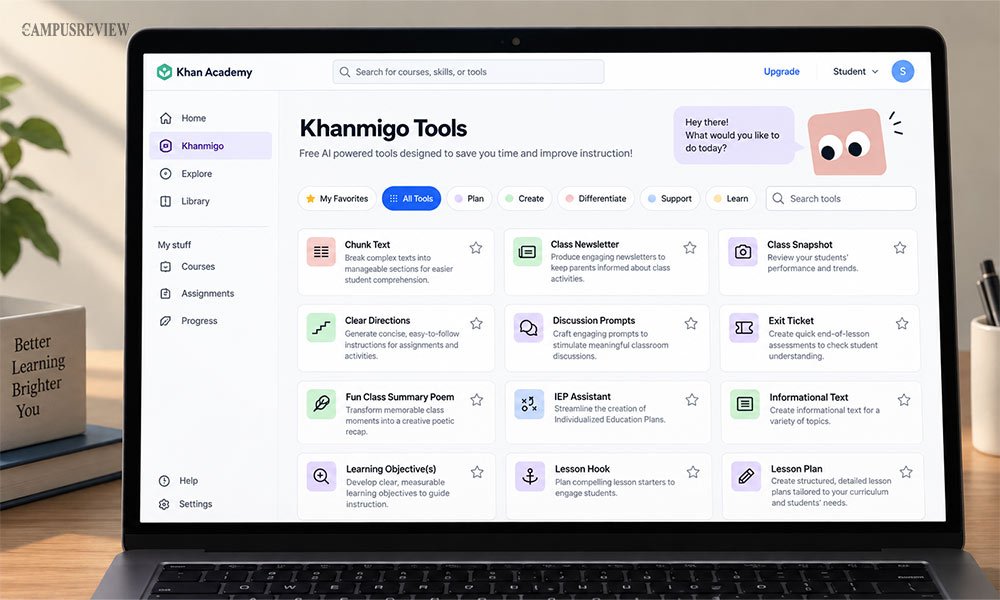
Khanmigo is Khan Academy’s AI tutor designed mainly for school students. It uses Socratic questioning to guide students instead of simply giving answers. It also works with Khan Academy’s curriculum and includes safety features for parents and teachers.
How to use: Ask Khanmigo about a topic or problem and work through it step by step with its guidance.
Best for: K-12 students, especially those studying maths and science.
Wolfram Alpha
Wolfram Alpha is a computational engine that calculates answers instead of generating them like a chatbot. It can solve symbolic calculus, differential equations, statistics, and chemistry problems with step-by-step solutions.
How to use: Enter the equation or problem directly instead of describing it in a sentence. More precise input gives more precise results.
Best for: Engineering, physics, and advanced maths.
Photomath
Photomath helps students solve math problems by scanning them with a camera. It shows the working step by step and provides explanations to help students understand how the answer was reached.
How to use: Scan a printed or handwritten problem with your camera and follow the steps to understand the solution.
Best for: School maths through early calculus.
How to Write a Good AI Study Prompt
Most students get flat, generic answers because their prompts are vague. A stronger prompt has three parts: a role for the AI, a specific task, and a clear instruction on the output you want.
- Set a role: Tell the AI who to act as. This sets the tone and depth of its answer.
- Give it a task: State exactly what you need, not a general topic.
- Ask for output: Say what format you want the answer in.
Four prompts you can copy today:
For a hard concept: “Explain photosynthesis to me like I’m learning it for the first time. Use a simple example and then ask me 3 questions to check if I understand.”
For flashcards: “Turn my notes about the French Revolution into 5 flashcards. Put one fact on each card, focus on important dates, people, and events, and use fill-in-the-blank questions for key terms.”
For a practice exam: “Act as a university biology professor. Create 3 multiple-choice questions from my notes. Make the wrong answers reflect common student mistakes. Start with easier questions and make them harder. Put the answer key at the end.”
For a diagram: “Explain this diagram of the human heart. Show me how blood moves through each part. Explain the main differences between the right and left sides, and finish with a simple summary table.”
Notice that none of these prompts ask the AI to do the final assignment. They ask it to teach, quiz, or coach, which keeps the actual learning in your hands.
Bonus AI Tools for Students
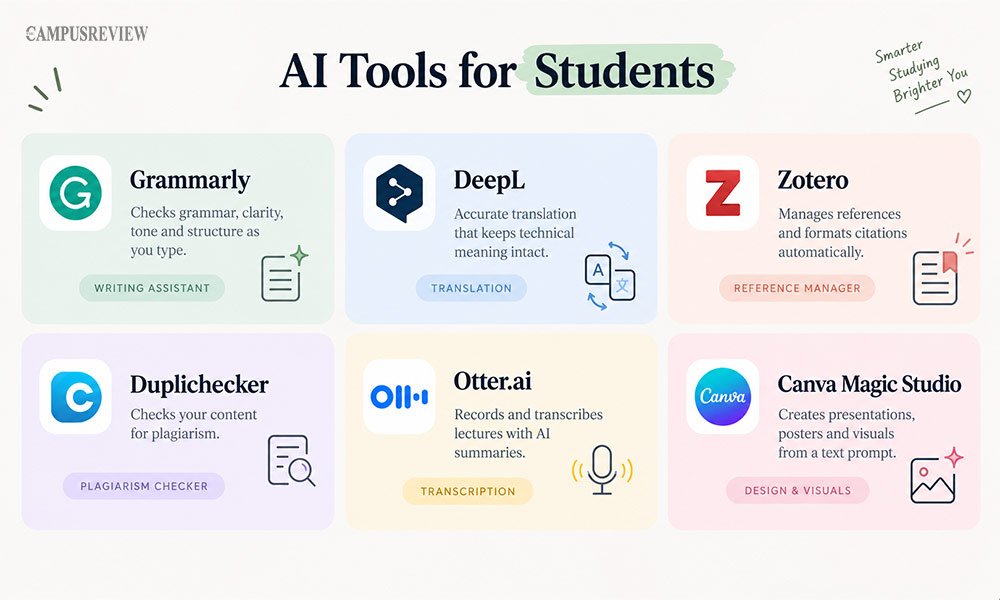
Use these AI tools to save time on writing, organisation, research, and other student tasks.
Grammarly: The best known AI writing tool for students. It checks grammar, clarity, tone and structure as you type. The free plan covers most writing. Premium adds plagiarism detection and deeper rewrites, and many universities provide it free.
DeepL: A translation engine that keeps technical meaning intact. International students use it for dense academic papers where standard translators lose the nuance.
Zotero: A free, open source reference manager. It captures citation details from any PDF or web page and formats your bibliography inside Word or Google Docs. AI plugins can summarise your saved library.
Duplichecker: A free plagiarism checker for a quick pass before you submit. Free checkers catch less than institutional tools like Turnitin, so treat it as a first check, not a guarantee.
Otter.ai: Records and transcribes lectures live, then produces a searchable transcript with a summary. Useful when a lecturer speaks fast.
Canva Magic Studio: Builds presentations, posters and diagrams from a text prompt. Handy for group project slides and viva presentations.
You may also see Mindgrasp, Studley AI and StudentAI in similar roundups. They work much like Gemini Notebook and StudyFetch, turning uploaded files into AI generated study guides and quizzes. Try them only if a tool above does not fit your workflow.
Three Mistakes to Avoid
Avoid these common mistakes to get better results from AI study tools and make your study time more effective.
- Using five tools at once. Your notes end up scattered and none of the tools know your full course. Pick two and stay there for a semester.
- Trusting a number without checking it. AI study assistants still get statistics and dates wrong. Click the citation.
- Reading the answer instead of attempting it. Familiarity feels like knowledge. It is not, and an exam finds the difference instantly.
Final Thoughts
There is no single best AI tool for every student. Gemini Notebook and Anki are hard to beat if you want free and dependable. Khanmigo and Gemini Guided Learning suit students still building the basics.
Perplexity AI and Wolfram Alpha earn their place when accuracy is the whole assignment. Choose one tool for summaries and one for recall. Test them for a week before deciding.