Young children already hear voice assistants and watch apps choose videos. So, should preschool teach AI? Yes, but not with screens first.
AI in preschool education introduces children aged 3–6 to basic AI concepts through play, using activities like sorting cards, building patterns, and guiding robots. Teachers can later introduce digital tools to explain how machines follow rules and learn from examples.
This guide covers 10 hands-on activities, 5 checked tools, a 4-week plan, and essential safety rules. You can start with classroom basics like cards, blocks, and tape.
What Is AI in Preschool Education?
AI in preschool education helps young children understand smart machines through play, stories, and adult-led tools. AI in preschool education is part of the broader use of AI in education, where technology supports teaching and learning.
Research supports this approach. MIT Media Lab’s PopBots study found that children aged 4 to 7 can learn basic machine learning concepts through hands-on play. The AI4K12 initiative identifies five big ideas in AI education, which preschool activities can introduce in simple ways.
Preschoolers learn AI concepts best through hands-on play, using objects and actions rather than abstract explanations.
Follow three rules:
- Keep screens short. The American Academy of Pediatrics advises no more than one hour of high-quality programming daily for ages 2 to 5, ideally watched with an adult.
- Let adults run every tool. NAEYC and the Fred Rogers Center emphasise adult guidance when using technology with young learners.
- Protect privacy. Never enter children’s names, faces, voices, or birthdates into an AI platform.
What Can Preschoolers Learn About AI?
These games build computational thinking for ages 3 to 6 and introduce the basic ideas behind AI. They are not AI tools but hands-on learning activities.
| AI concept | What it means | Preschool example |
| Pattern recognition | Spotting what repeats | Finishing a coloured block pattern |
| Classification | Putting things into groups | Sorting animal cards by fur, feathers, or scales |
| Training data | Learning from examples | Teaching a teacher “robot” with picture cards |
| Prediction | Guessing what comes next | Guessing the next block in a train |
| Voice recognition | Turning spoken words into action | Testing a smart speaker with and without noise |
| AI-assisted creativity | Making stories or pictures from ideas | Building a story while an adult types |
10 AI Activities for Preschoolers
These teacher-led AI activities suit 20–30-minute sessions for ages 3 to 6. Using cards, blocks, tape, and toys, they introduce AI concepts through play.
1. Train the Teacher
AI idea: A machine learns rules from examples (training data).
You need: 20 to 30 animal picture cards, a green tray, and a red tray.
1. Pick a secret rule, such as “animals that swim.” Keep it hidden.
2. Act like a robot that knows nothing. Children show you one card at a time.
3. Put each matching card in the green tray. Put the others in the red tray. Say, “This matches my training data,” or “This does not.”
4. Ask children to guess the secret rule.
Bias round: Change the rule to “dogs.” Show only big dogs first, then reject a Chihuahua. Ask, “Did the robot fail, or did we give it too few examples?”
Children see that AI makes mistakes when people give it limited examples.
2. Sort the Animals
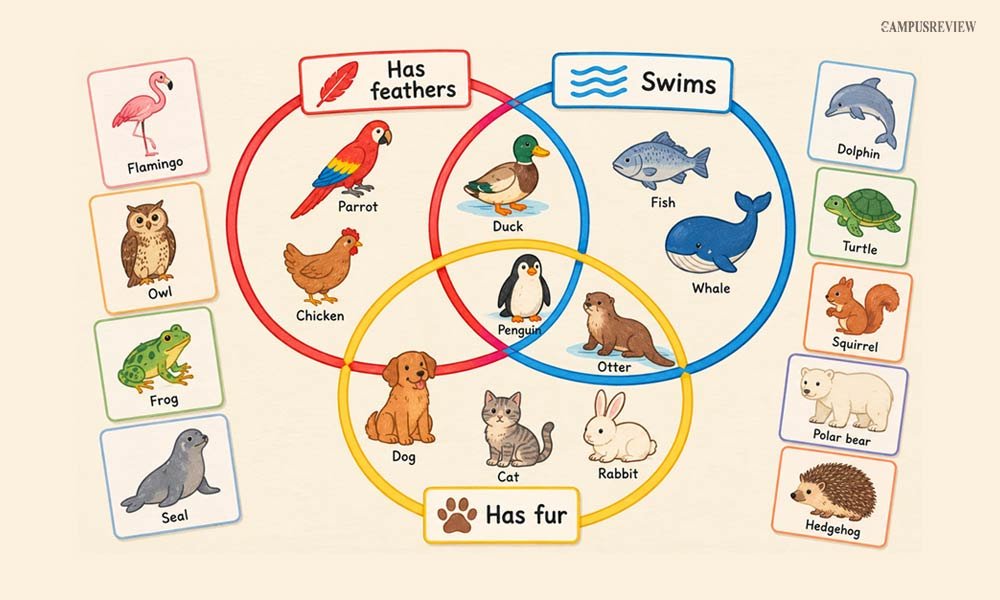
AI idea: Classification. Computers group things by features.
You need: Three floor hoops and animal toys or cards.
1. Overlap the hoops. Label them with pictures: “has feathers,” “swims,” and “has fur.”
2. A child picks an animal and says why it belongs in a hoop.
3. Place a duck where “feathers” and “swims” overlap.
4. Add a penguin and an otter. Let children argue about where they go.
Sorting is an ordinary game. It becomes one of the best classification games for kids when you explain that AI also groups things by features, and some things fit more than one group.
3. Feature Scavenger Hunt
AI idea: Image recognition. Computers learn from many labelled pictures.
You need: Small baskets, picture clue cards (“smooth and oval,” “jagged edges”), and a camera.
1. Give each pair a clue card and a basket.
2. Send them outside to collect items that match the clue.
3. Lay each collection on a white sheet. Photograph it from above.
4. Compare the piles. Ask which items could confuse a camera, such as shadows or similar colours.
These image recognition activities show that people must collect and label the pictures first. Keep children’s faces out of every photo.
4. The Pattern Train
AI idea: Prediction from patterns.
You need: Interlocking blocks in two or three colours.
1. Build a train in a pattern, such as red, blue, red, blue.
2. Ask, “What colour comes next?”
3. Move up to red, blue, green and then to red, red, blue, blue.
4. Snap in the wrong block. Children play “bug hunters” and find it.
Tip: Add a clap for red and a stomp for blue. These pattern recognition activities and sequencing activities for preschoolers also train memory and focus.
5. Mystery Box Sensors
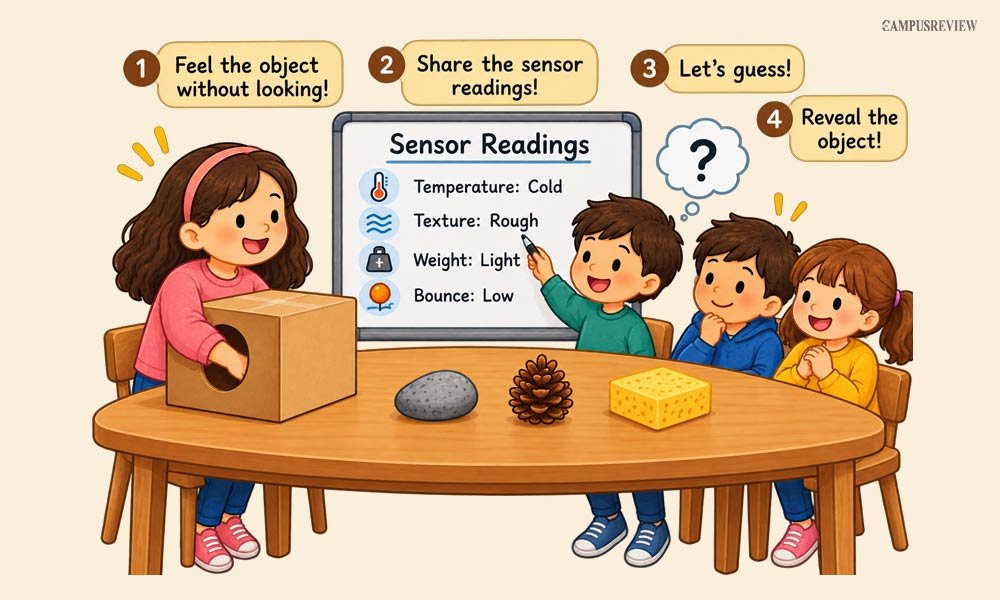
AI idea: Sensors collect data. A program then makes a guess.
You need: A box with a hand hole, a few objects (a cold stone, a pinecone, a sponge), and a whiteboard titled “Sensor Readings.”
1. A child feels the hidden object without naming it.
2. The child says its temperature, texture, weight, and bounce.
3. You write each reading on the board.
4. The class studies the readings and guesses the object. Reveal it.
Explain that cameras and microphones also collect readings. Then a program guesses what they mean.
6. Guess What I Will Pick
AI idea: Prediction from past choices.
You need: A puppet, a rock-paper-scissors picture board, and a magnet board for tallies.
1. A child plays rock-paper-scissors against the puppet for eight rounds.
2. Record every pick on the board.
3. Before each round, ask the class what the puppet should predict, based on the tally.
4. Tell the child to change their pattern. Watch the puppet’s guess fail.
Children learn that AI predicts from past data, not from magic. The puppet fails when the player changes behaviour.
7. Robot Dance
AI idea: Machines follow exact instructions. Mistakes are “bugs.”
You need: Painter’s tape for a 3 by 3 floor grid, direction cards (forward, turn left, turn right, jump), and a plush toy.
1. Place the plush toy on the grid as the target.
2. One child, the “programmer,” lays out command cards in order.
3. Another child, the “robot,” follows each card exactly.
4. If the robot goes the wrong way, call it a bug. Check the cards one by one, swap the wrong card, and run it again.
Children practise sequencing and learn that fixing mistakes is normal. Floor robots like Bee-Bot extend this game.
8. Voice Detective
AI idea: Voice recognition. Microphones capture sound but do not understand it.
You need: A smart speaker that only the teacher uses, plus shakers or a water bowl for noise.
1. In a quiet room, ask the speaker, “What is the weather today?” It answers.
2. Ask the children to make noise. Repeat the same question at the same volume.
3. Watch the speaker struggle or fail.
4. Ask, “Why can your ears pick out one friend’s voice, but the speaker cannot?”
Safety: Smart speakers usually process requests online. Only the teacher speaks to the device. Children never give names or personal details.
This keeps voice recognition for children safe and teaches that conversational AI for children is a machine, not a friend. No speaker? Play the whisper game in a noisy room instead.
9. AI Story Builder
AI idea: Generative AI predicts likely words. It does not understand stories.
You need: A shared screen, an adult-run AI storytelling tool, chart paper, and markers.
1. Ask children to choose a character, a place, and a problem. For example, “a shy dragon,” “a bakery on the moon,” and “a lost map.”
2. Type their ideas into the tool. Include no names or photos.
3. Read the story aloud in small parts. Children act as editors and ask, “Does this make sense? Did it follow our idea?”
4. Fix the mistakes together. Then children draw their own ending, and you write what they say.
Safety: Check the tool’s age rules first. Use a teacher account and review the output before you read it to the class.
10. Storybook Path
AI idea: Recommendations follow rules and past choices.
You need: Coloured tape and four baskets of picture books.
1. Tape a path on the floor that splits in two.
2. Say, “Want an energetic story? Take the orange path left. Want a quiet one? Take the blue path right.”
3. At the next split, say, “Want animal characters? Go yellow. Want people? Go green.”
4. Each path ends at a basket that matches the choices. The child picks a book.
Explain that video apps suggest shows similarly. They follow “if this, then that” rules based on what you watched before.
Best AI Tools for Preschool Education
Start with screen-free tools like Bee-Bot and KIBO, then introduce teacher-led tools such as Teachable Machine and Quick, Draw! to demonstrate AI concepts safely.
| Tool | Use | Cost or access | Age and safety |
| Bee-Bot | Button-controlled floor robot | About 90-130 | Ages 3+; screen-free |
| KIBO | Wooden-block coding robot | 310–325 | Ages 4-7; screen-free |
| Teachable Machine | Trains image, sound, or pose models | Free, browser-based | Teacher use only; avoid filming children |
| Quick, Draw! | AI guesses drawings | Free, browser-based | Teacher-led; use simple objects |
| ScratchJr | Animates characters with coding blocks | Free app | Ages 5-7; adult guidance needed |
We excluded adaptive learning platforms and AI lesson planners because their preschool suitability and data policies were unclear. Teachers can use AI for lesson planning, but must avoid entering child data and verify every output.
A 4-Week AI Learning Plan for Preschoolers
Run one activity per session. Keep any digital demo short, about 10 to 15 minutes. Finish each week with a quick chat about what the children learned.
| Week | Learning theme | Activities | Children can say |
| Week 1 | Learning from examples | Train the Teacher, Sort the Animals, Feature Scavenger Hunt | “A robot needs examples to learn.” |
| Week 2 | Patterns and prediction | Pattern Train, Mystery Box Sensors, Guess What I Will Pick | “Machines use readings and past choices to guess.” |
| Week 3 | Instructions and interaction | Robot Dance, Voice Detective | “Machines follow exact steps and can mishear.” |
| Week 4 | Creativity and recommendations | AI Story Builder, Storybook Path | “People must check what machines make.” |
Tips for Introducing AI in Preschool Classrooms
Choose simple, age-appropriate AI activities and teacher-approved tools to introduce AI safely in your preschool classroom.
- Keep activities short, playful, and age-appropriate.
- Put physical play and face-to-face talk first.
- Let adults run every AI tool and check its output.
- Never enter children’s personal information into AI platforms.
- Say clearly that AI makes mistakes.
- Show children the plastic, wires, and batteries inside a device. This stops them from thinking machines are alive.
- Call ordinary sorting and pattern games what they are. They show ideas related to AI. They are not AI tools.
Final Words
AI in preschool education does not mean more screens. It means play that shows children how machines learn, predict, and follow instructions.
Start with Train the Teacher and the Pattern Train this week. Add a robot or a short browser demo later. Keep adults in charge, protect children’s data, and remind everyone that AI can be wrong.
Pranjal Kharche
Frequently Asked Questions
1. How can teachers introduce AI without screens?
Teachers can introduce AI without screens by using animal cards, blocks, direction cards, and taped floor grids to teach patterns, classification, and sequencing.
2. What are the benefits of AI activities in preschool?
AI activities build pattern recognition, problem-solving, sequencing, teamwork, and an understanding of how machines follow rules.
3. Do preschool teachers need special AI tools?
No. Preschool teachers do not need special AI tools: cards, blocks, and toys are enough. Teachers can also use free digital tools for demonstrations and lesson planning.
4. Can AI personalize learning for preschoolers?
Some platforms adapt activities to children’s responses, but teachers should verify age suitability. They can personalize screen-free play by adjusting tasks to each child’s needs.