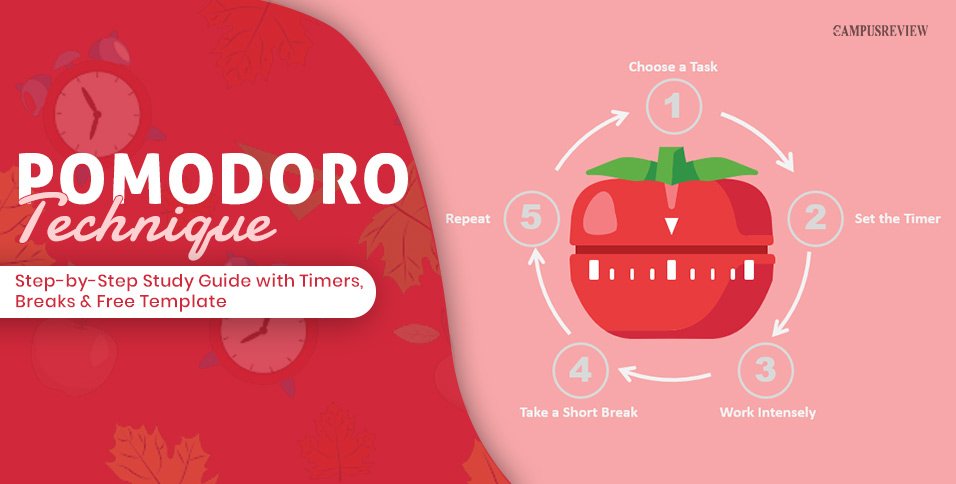
You sit down to study, but your phone keeps distracting you. The Pomodoro Technique helps you focus by alternating 25 minutes of study with 5-minute breaks. Developed by Francesco Cirillo in the late 1980s, this method breaks large tasks into smaller, manageable steps.
This guide explains how to use the Pomodoro Technique for students, choose a study timer, manage distractions, and plan exam preparation with a sample study schedule.
What Is the Pomodoro Technique?
The Pomodoro Technique is a time management method that splits your study time into focused study sessions of 25 minutes with short breaks in between. Each session is called a Pomodoro. The word means “tomato” in Italian.
Francesco Cirillo was a university student in the late 1980s who struggled to finish work without burning out. He challenged himself to focus for ten minutes using a tomato-shaped kitchen timer. That small experiment became the Pomodoro Technique.
In his book, Cirillo also introduced the idea of “inverting time.” Instead of worrying about time running out, you focus on the work you complete. This shift can help reduce deadline stress.
How Does the Pomodoro Technique Work?
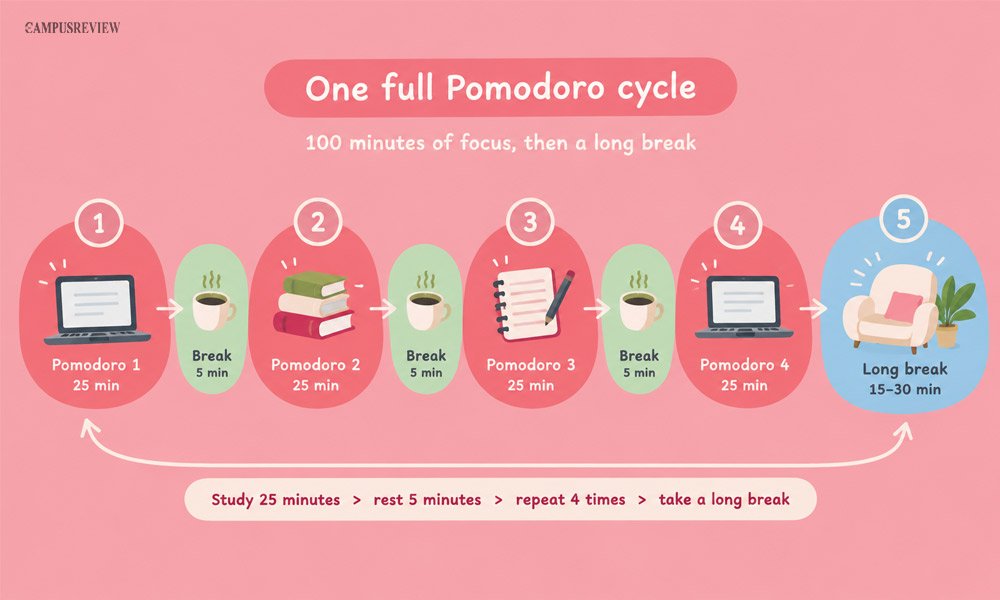
The Pomodoro Technique works in a simple loop. You focus, rest, and repeat. Here is the basic cycle:
1. Pick one task to study.
2. Set a study timer for 25 minutes.
3. Work on that task only until the timer rings.
4. Mark one Pomodoro on your sheet.
5. Take a 5-minute break.
6. After four Pomodoros, take a long break.
| Interval | Length | What You Do |
| Focus session (Pomodoro) | 25 minutes | Study one task. No phone, no task switching. |
| Short break | 5 minutes | Stand up, stretch, drink water, rest your eyes. |
| Long break | 15 to 30 minutes | Eat, walk, or relax after four Pomodoros. |
The 25-Minute Focus Session
A Pomodoro is one block of focused study on one task. You cannot split it in half. Once the timer starts, it must ring. If you finish early, use the extra minutes to review your work. This habit is called overlearning. If something urgent stops you, drop that Pomodoro and start a fresh one later.
The standard length of a Pomodoro is 25 minutes. If you keep avoiding a task, try 10 or 15 minutes. If you do deep work like writing, try up to 50 minutes. Pick the length that keeps you focused without making you tired.
The 5-Minute Short Break
A short break starts the moment the timer rings. Stand up and stretch. Drink water. Look out of the window. Skip your phone. These 5-minute study breaks only work when your brain actually rests.
The 15- to 30-Minute Long Break
Four Pomodoros add up to 100 minutes of focus. After that, take a long break of 15 to 30 minutes. Eat a snack, walk outside, or lie down for a bit. Long study breaks give your brain time to recover before the next round.
Cirillo also set three rules that keep the method simple:
- Break big tasks down. Split any task that needs more than 5 Pomodoros into smaller steps.
- Group small tasks. Combine tasks that take less than 15 minutes into one Pomodoro.
- Let every Pomodoro ring. Never stop a session early to check messages.
How to Use the Pomodoro Technique
This is the part you can follow today. Use these eight steps to run your first full study day. You only need a notebook, a pen, and a study timer.
Step 1: Write Down Everything You Need to Study
Grab a notebook or an app. List every task you have. Cirillo calls this your Activity Inventory. A student’s list might look like this:
- Finish physics problem set 4
- Revise biology chapter 6
- Write the history essay outline
- Print the chemistry notes
Step 2: Break Big Tasks and Group Small Ones
A task like “Study Organic Chemistry Chapter 5” can feel overwhelming. Break it into four clear Pomodoros to make it easier to start:
- Pomodoro 1: Draw the reaction pathways from memory.
- Pomodoro 2: Solve problem set 12.1 to 12.8 without the answer key.
- Pomodoro 3: Check your mistakes and redo the wrong answers.
- Pomodoro 4: Take a timed practice test.
Now do the opposite for tiny tasks. Printing notes, writing the history essay outline, and checking the course portal each take a few minutes. Put all three into one Pomodoro.
Step 3: Plan Your Pomodoros for the Day
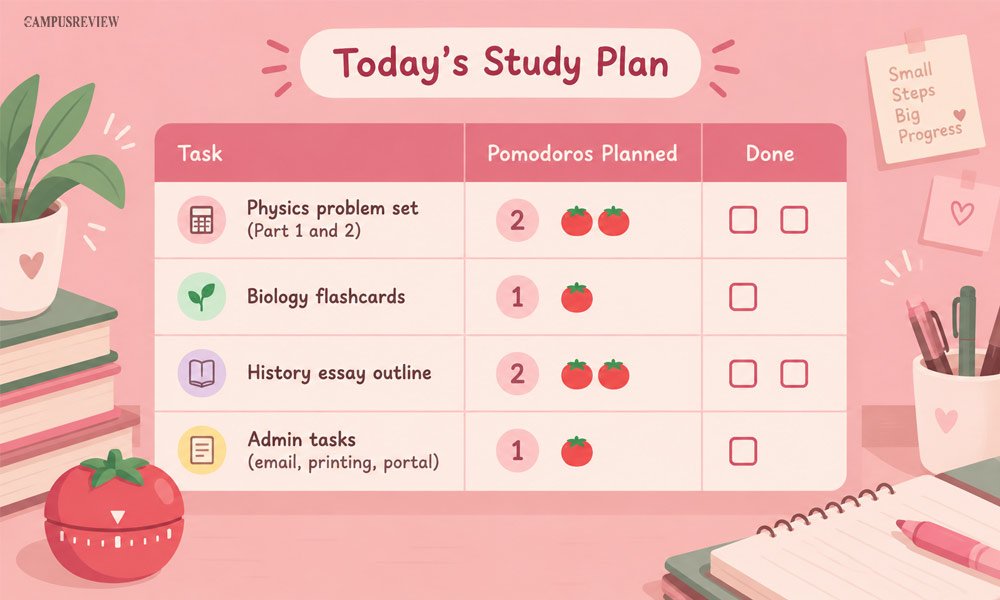
Pick three to five tasks. Put the most important one first. Next to each task, draw empty boxes. One box equals one Pomodoro. This is your “To Do Today” sheet.
Beginners should plan 4 to 6 Pomodoros a day. Leave one spare Pomodoro as a buffer. Some tasks always take longer than you expect.
Step 4: Set Up Distraction-Free Studying
Silence your phone and put it out of reach. Close extra browser tabs. Keep water on your desk. Tell the people around you that you are studying for the next 25 minutes. This small preparation makes it much easier to stay on task.
Step 5: Start the Timer and Study One Task
Set the timer for a 25-minute study session. Start with your top priority task. Do not switch tasks. Do not check messages. If you study a chapter, try active recall. Close the book, write what you remember, then check your notes. This works far better than rereading.
Step 6: Handle Distractions the Cirillo Way
To manage distractions, sort them into two types. Each type has a simple fix.
| Type | Example | What to Do |
| Internal | You want to check Instagram or look up something random. | Write the urge on a “distraction list.” Mark an apostrophe (‘) on your sheet. Return to your task. |
| External | A roommate starts talking to you. | Use Inform, Negotiate, Schedule. Say: “I am studying until 5:30. Can we talk then?” Mark a dash (-) on your sheet. |
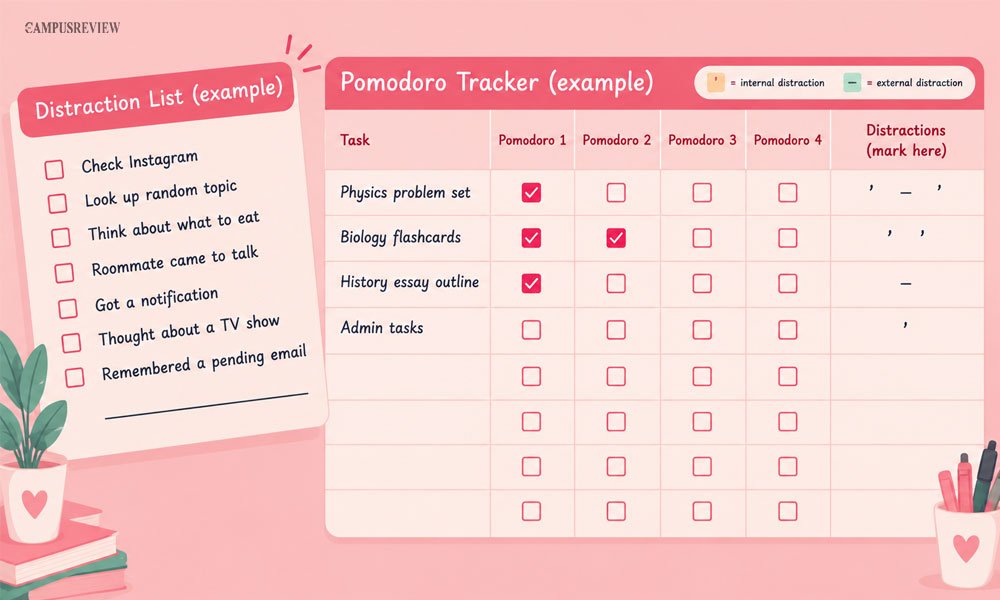
Look at your distraction list during your break. Most of those urges lose their power once you write them down.
Step 7: Mark Your Pomodoro and Take a Break
When the timer rings, tick one box. Start your 5-minute break right away. Do not finish “just one more thing.” Cirillo’s system only works when you rest on time.
Step 8: Review Your Day
Spend 5 to 10 minutes at night on a quick review. Count your finished Pomodoros. Note which task took longer than planned. Notice the time of day you focused best. After two weeks, you will plan your study routine far more accurately.
Sample Pomodoro Study Schedule You Can Copy
This schedule uses eight Pomodoros, which gives about 3 hours and 20 minutes of focused study. Take a 5-minute break after each Pomodoro, except where the table shows a long break.
Download your printable Pomodoro study schedule template below.
Read or download the complete guide below.
View / Download PDF| Time | Pomodoro | Task | How to Study |
| 9:00 to 9:25 | 1 | Physics concepts | Active recall: write key formulas from memory |
| 9:30 to 9:55 | 2 | Physics problems, Part 1 | Solve without looking at notes |
| 10:00 to 10:25 | 3 | Physics problems, Part 2 | Finish the set and mark your errors |
| 10:30 to 10:55 | 4 | Physics error review | Redo every missed problem |
| 10:55 to 11:25 | Long break | Rest | Eat, walk, no screens |
| 11:25 to 11:50 | 5 | Biology flashcards | Spaced repetition: test yourself on cards |
| 11:55 to 12:20 | 6 | Biology diagrams | Label cell diagrams from memory |
| 12:25 to 12:50 | 7 | History essay outline | Write your thesis and main points |
| 12:55 to 1:20 | 8 | History essay sources | Gather sources and note key quotes |
Three Pomodoro sessions are enough for a good study session when you have less time. You’ll need about 85 minutes, including breaks, for 75 minutes of focused study.
Example: A History Term Paper in Four Pomodoros
Writing a paper feels huge. Four Pomodoros make it manageable:
- Pomodoro 1: Find your sources and pull out key points into an outline.
- Pomodoros 2 and 3: Write the body paragraphs. Do not stop to edit. Keep moving.
- Pomodoro 4: Check that your thesis matches your points. Fix your references.
Benefits of the Pomodoro Technique for Students
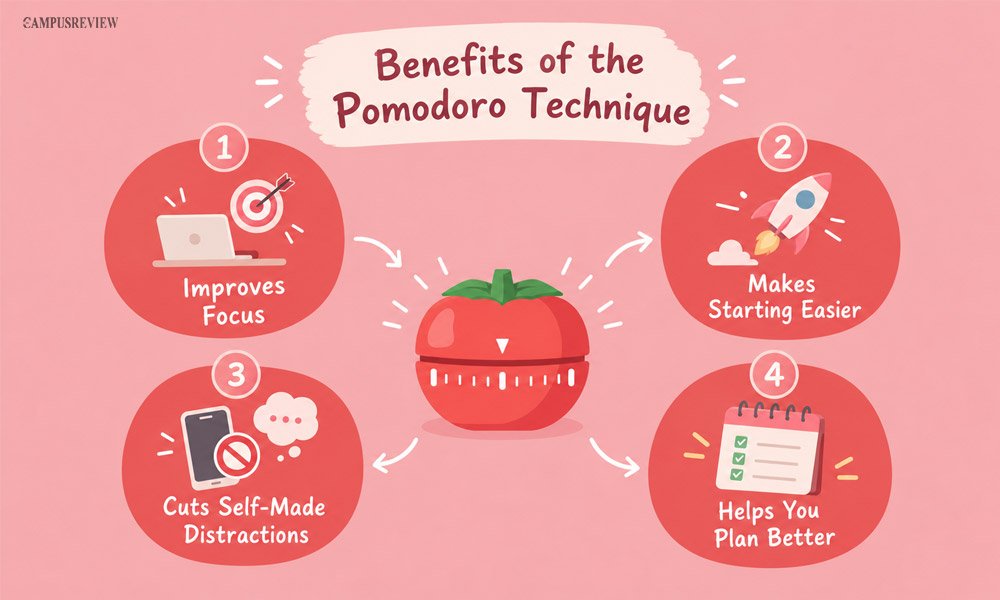
The Pomodoro Technique offers several benefits for students, from improving focus and reducing distractions to managing study time, retaining information, and preventing burnout.
It Improves Focus and Reduces Fatigue
Research says the Pomodoro Technique improves focus. A 2025 review in BMC Medical Education examined 32 studies involving 5,270 participants. Three trials found that timed Pomodoro breaks reduced fatigue by about 20% and improved motivation and focus. However, the authors called for more long-term research.
It Makes Starting Easier
Psychology professor Tim Pychyl links procrastination to how we handle negative feelings about a task. A giant task feels scary. A 25-minute task feels easy. The Pomodoro Technique shrinks the first step, so you begin without a fight.
It Cuts Self-Made Distractions
Researcher Gloria Mark suggests that about half of our distractions come from ourselves, not from outside. Each Pomodoro covers one task, so you train your concentration. Each break gives you a planned moment to check messages.
It Helps You Plan Better
Most students guess how long a task will take, and they guess too low. Psychologists call this the planning fallacy. When you count Pomodoros, you learn how long tasks really take. Your timetable gets more realistic each week.
It Helps Prevent Student Burnout
Long study sessions drain your energy and make it harder to remember things. Regular breaks keep your mind fresh, reduce tiredness, and help prevent student burnout.
Best Practices for Using the Pomodoro Technique
Follow these best practices to make the Pomodoro Technique more effective, stay focused, and manage your study time better.
Keep Your Breaks Screen-Free
Social media is the biggest trap during a break. A “quick look” often turns into a long scroll. Walk around, stretch, or grab a snack instead. You will return to your desk with a clearer head.
Adjust the Timer to Your Task
The 25/5 rhythm is a starting point, not a law. Change it to match your task and your energy.
| Style | Focus Time | Break | Best For |
| Short Pomodoro | 10 to 15 minutes | 3 to 5 minutes | Tasks you keep avoiding |
| Classic Pomodoro | 25 minutes | 5 minutes | Flashcards, drills, problem sets |
| Longer Pomodoro | 45 to 50 minutes | 10 to 15 minutes | Essay writing, coding, deep reading |
| Flowtime | Work until focus fades | Break after, based on how long you worked | Creative work when you are in the zone |
Do Not Force a Break When You Are in Flow
Sometimes you get lost in a task, and the ideas flow. Stopping at exactly 25 minutes can break that momentum. In those moments, let the session run longer or try Flowtime, a stopwatch-based method that lets you work until your focus fades.
Pair Pomodoro with Self-Testing
A timer will not make you learn. What you do inside the timer matters most. Use your Pomodoros for practice questions, self-quizzes, and writing answers from memory.
Measure Learning, Not Just Count
Eight Pomodoros of passive reading is worse than four Pomodoros of real practice. Ask yourself after each session: “Can I explain this without my notes?” If yes, you are doing it right.
Best Pomodoro Timers and Study Tools
The best Pomodoro timer for studying is the one you will actually use, so pick a study timer for students that feels simple. A simple web timer like Pomofocus works well for most students. If your phone distracts you, a physical timer is safer. Here are your main choices.
Pomofocus
Pomofocus is a simple web-based focus timer built for the Pomodoro Technique. It runs in your browser, so you do not need to install anything. Here is how to use it:
1. Open Pomofocus in your browser.
2. Set your timers to 25 minutes for focus, 5 minutes for a short break, and 15 minutes for a long break.
3. Add your tasks and the number of Pomodoros each one needs.
4. Press Start and study until the alarm rings.
Physical Timers
A kitchen timer or a visual timer removes phone notifications completely. Turning the dial gives you a clear signal that your focus time has begun. Visual timers, like the Time Timer, show the remaining time as a shrinking colored disk. You see time pass without reading numbers. This is a great choice if you want true distraction-free studying.
Web and Mobile Study Timers
Many study apps add extra features to a plain timer. Two popular ones are:
- Forest: You plant a virtual tree when you start a session. The tree grows while you focus. It withers if you leave the app. This gives you a gentle push to stay off your phone.
- Focus To-Do: This app combines a Pomodoro timer with a task list. It also tracks your focus history and syncs across devices.
| Tool | Type | Best For | Watch Out For |
| Pomofocus | Web timer | A quick, simple start | Runs in your browser, so tabs can distract you |
| Physical timer | Hardware | A phone-free desk | No automatic study log |
| Forest | Mobile and browser app | Students who check their phones | Needs you to keep the app open |
| Focus To-Do | Timer plus task app | Tracking many subjects | More features mean more setup |
Final Thoughts
The Pomodoro Technique gives you a simple way to study with focus. Choose one task, set a study timer for 25 minutes, and take a real break. Plan your day with Pomodoro boxes, handle distractions with a list, and pair every session with active recall. Start with just one Pomodoro today. Track your results for two weeks, then adjust the timer to fit you.
Pranjal Kharche
Frequently Asked Questions
1. How many Pomodoro sessions should a student do per day?
Beginners should start with 4 to 6 Pomodoros a day. Many students build up to 8 to 12 on full study days, which gives about 3 to 5 hours of focused work. Add a few spare sessions in case a task runs long. Quality matters more than the count.
2. What should students do during a Pomodoro break?
Rest your brain during a Pomodoro break. Stand up, stretch, drink water, walk around, or look at something far away. Avoid social media, messages, and short videos. These pull your attention back in and make it harder to return to your work.
3. Can I use the Pomodoro Technique while writing assignments?
Yes, students can use the Pomodoro Technique while writing assignments. Dedicate separate sessions to research, outlining, writing, and editing. This helps you manage large assignments without feeling overwhelmed.